
The 3-2-1 Backup Rule: How Small Businesses Can Survive a Ransomware Attack
Ransomware is no longer a threat reserved for large corporations and government agencies. Today, cybercriminals are actively targeting small businesses — and London SMEs are firmly in their sights. A single successful attack can encrypt every file on your network, bring your operations to a complete standstill, and leave you facing an impossible choice: pay the ransom or lose everything.
The good news is that there is a simple, time-tested strategy that can make ransomware far less devastating for your business. It’s called the 3-2-1 backup rule, and if you’re not already following it, now is the time to start.
What Is Ransomware and Why Should London SMEs Be Worried?
Ransomware is a type of malicious software that infiltrates your systems — usually through a phishing email, an unsecured remote desktop connection, or a compromised third-party supplier — and encrypts your files. The attackers then demand a ransom, typically in cryptocurrency, in exchange for the decryption key.
What makes ransomware particularly destructive in 2026 is how sophisticated it has become. Modern ransomware doesn’t just lock your files — it exfiltrates your data first, giving attackers a second point of leverage. Pay up, or we publish your client records. For a London law firm, accountancy practice, or healthcare provider, that threat alone can be catastrophic.
The financial damage goes well beyond any ransom payment. There’s lost trading time while systems are offline, staff unable to work, clients lost to competitors, regulatory scrutiny under UK GDPR, and reputational damage that can take years to repair. According to industry research, around 60% of small businesses that suffer a serious cyberattack close within six months — not necessarily because of the attack itself, but because of the cascading consequences.
The single most effective thing you can do to limit that damage is to maintain backups that ransomware cannot reach. That’s precisely what the 3-2-1 rule is designed to achieve.
What Is the 3-2-1 Backup Rule?
The 3-2-1 backup rule is a straightforward data protection strategy that has been a cornerstone of IT best practice for decades. Despite its simplicity, a surprising number of small businesses either don’t follow it at all or only partially implement it — leaving dangerous gaps in their defences.
Here’s what it means:
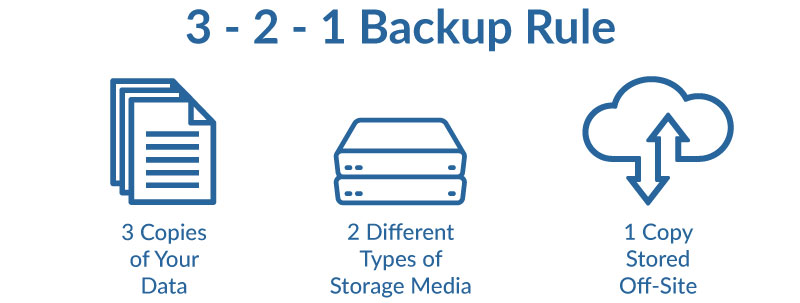
3 — Keep three copies of your data
You should always have at least three copies of any important data: the original version that your team works from, plus two separate backup copies. The logic is simple — if one copy is compromised or lost, you still have two more. If a second fails or is also encrypted in a ransomware attack, you still have a third to fall back on.
2 — Store backups on two different types of media
Your two backup copies should be stored on different types of storage media. For example, one copy on a local external hard drive or NAS (Network Attached Storage) device, and a second copy in cloud storage or the reverse. The reason for this is that different storage media fail in different ways. A hardware fault that wipes your local drive won’t affect your cloud backup, and vice versa.
1 — Keep one copy offsite
At least one of your backup copies must be stored in a completely separate physical location — or in the cloud, which is effectively offsite by definition. This protects you against localised disasters: a fire, a flood, a theft, or a ransomware attack that spreads across every device connected to your office network. If all three copies of your data are in the same building, a single event can destroy all of them simultaneously.
Why the Standard 3-2-1 Rule Isn’t Quite Enough in 2026
The 3-2-1 rule remains excellent foundational advice, but modern ransomware has evolved to specifically target backup systems. Many ransomware variants will actively search your network for backup drives and cloud sync folders before triggering encryption — meaning that if your backups are connected to the same network as your primary systems, they can be encrypted along with everything else.
This is why IT professionals now recommend a critical additional layer: immutable backups.
An immutable backup is one that cannot be altered, deleted, or encrypted — even by someone with administrator access to your systems. It’s typically achieved through a combination of air-gapped storage (physically disconnected from your network) and cloud-based object storage with write-once-read-many (WORM) policies. The principle is that the backup exists in a state that no ransomware, and no rogue employee, can tamper with.
The updated framework some now refer to as the 3-2-1-1 rule adds a fourth requirement: at least one copy should be immutable and stored offline or in an isolated environment.
Several major cybersecurity frameworks require or strongly mandate immutable backups, including NIST SP 800-53 (Rev. 5), the NIST Cybersecurity Framework (CSF) 2.0, CIS Controls v8, CMMC 2.0, PCI DSS v4.0, HIPAA Security Rule, ISO/IEC 27001:2022, SOC 2 (AICPA Trust Services Criteria), the SEC Cybersecurity Rules (2023), FINRA/CFTC Rules, and FedRAMP. These frameworks collectively recognize immutable backups as a critical control for protecting backup data from unauthorized modification, deletion, or encryption — particularly in response to the growing threat of ransomware attacks targeting backup repositories.
This might sound complex, but for a small London business with the right IT partner in place, it can be set up, automated, and monitored without placing any burden on your day-to-day operations.
The Biggest Backup Mistakes Small Businesses Make
Understanding the 3-2-1 rule is one thing — actually implementing it correctly is another. These are the most common mistakes we see London SMEs making when it comes to backup:
Assuming Microsoft 365 and Google Workspace backs up your data. It doesn’t — at least not in the way you might think. Microsoft’s and Google’s responsibility is to keep their infrastructure running, not to recover your individual files following a ransomware attack or accidental deletion. Many businesses discover this the hard way. A dedicated third-party backup solution for your Microsoft 365 and Google Workspace data is essential.
Storing backups on the same network. If your backup drive is connected to your office network or mapped as a network drive, a ransomware attack can reach it just as easily as your primary systems. Backups must be isolated.
Never testing restores. A backup you’ve never tested is a backup you can’t trust. Many businesses discover that their backups are corrupted, incomplete, or simply don’t work — at the worst possible moment. Regular restore testing is non-negotiable.
Infrequent backups. If you only back up once a week, a ransomware attack on a Thursday could mean losing four days of work. Daily automated backups, at minimum, are the standard for any business-critical data.
No monitoring or alerts. Backup jobs fail silently all the time. Without active monitoring, you may go weeks without realising your backups have stopped running — only finding out when you desperately need them.
How to Implement a 3-2-1 Backup Strategy for Your London Business
Here is a practical framework for putting the 3-2-1 rule into action:
Step 1: Audit what data you actually have. Identify your most critical data — client records, financial files, project documents, emails, databases. Prioritise these for protection first.
Step 2: Set up automated daily backups to local storage. A NAS device or external drive attached to your server provides your first backup copy. Configure this to run automatically overnight. Ensure this device is not permanently connected to the network if possible, or is otherwise isolated from workstations.
Step 3: Set up automated cloud backups. Services like Microsoft Azure Backup, Veeam, or specialist solutions like Dropsuite for Microsoft 365 provide reliable, encrypted offsite backups. These run automatically and store your data in geographically separate data centres.
Step 4: Establish immutable or air-gapped copies for your most critical data. For particularly sensitive data, consider tape backup or cloud object storage with immutability policies enabled.
Step 5: Schedule regular restore tests. At minimum quarterly, test that you can actually restore files from your backups. Treat this as seriously as a fire drill — it is one.
Step 6: Document your recovery process. Make sure more than one person knows how to execute a restore. In a crisis, you may not have access to the person who normally handles it.
Backup and Disaster Recovery as Part of a Broader Cybersecurity Strategy
Backup is your last line of defence — critically important, but ideally something you never need to use. The goal is to layer your defences so that ransomware never reaches your systems in the first place.
At Small Business IT Support London, our cybersecurity services for small business take a multi-layered approach that combines backup and disaster recovery with endpoint protection, firewall management, email and phishing filtering, and staff security awareness training. We aim to prevent, detect, and respond to threats before they impact your operations.
Our managed IT support services include proactive monitoring of your backup systems so that if a backup job fails, we know about it immediately — not when you’re in the middle of a crisis. We also include disaster recovery planning as a core part of our managed service, ensuring that if the worst does happen, you have a clear, tested plan for getting back up and running with minimal downtime.
For businesses that want formal recognition of their security posture, we also offer support toward Cyber Essentials certification — the UK government-backed scheme that requires businesses to demonstrate they have fundamental protections in place, including proper controls around data access and recovery.
If ransomware does strike and you need immediate help, our emergency IT support services are available when your technology fails and you need fast, expert assistance.
The Bottom Line
Ransomware attacks are becoming more frequent, more sophisticated, and more expensive. For a small London business without robust backups, a single attack can be existential. The 3-2-1 backup rule — three copies of your data, on two different media types, with one stored offsite — is your most reliable insurance policy against that outcome.
But like all insurance, it only works if it’s in place before you need it. Setting up a proper backup strategy takes a matter of hours with the right support. Recovering from a ransomware attack without one can take weeks — if you recover at all.
If you’re not confident your current backup strategy would protect you in a real attack, we offer a free initial consultation to assess your current setup and identify any gaps. There’s no obligation — just an honest picture of where you stand and what it would take to protect your business properly.
Small Business IT Support London provides managed IT support, cybersecurity services, and backup and disaster recovery solutions to SMEs across London. Contact us on 0203 393 9714 or book your free consultation today.